


Messages
4.511.00 Reviews
App Specs
- Version
- 1.1.0
- Updated On
- License
- Free
- Downloads
- 100,000+
- Developer
- BOTTRRIER
- Categories
- Communication
- Platform
- Android
Screenshots
 Analysis by AppCompare
I judge a texting app by a plain question: does it make it easier to reach the people I already need to reach, without turning a simple exchange into a project? Messages aims to do that as a preset SMS messaging app, and that focus is its clearest appeal. I’d consider it when I want a familiar place for everyday texts, rather than a social platform that asks everyone in a conversation to join the same service.
Where a dedicated texting app fits
Text messaging has a practical advantage over many chat apps: it is often the channel people already use for short, useful exchanges. Think appointment changes, a quick note to a family member, or confirming where to meet. A preset SMS app can make those conversations feel central instead of leaving them scattered across social and work services. That makes Messages most interesting as a straightforward communication choice, not as a replacement for every way you talk to people.
There is a meaningful difference between SMS and internet-based messengers. SMS is tied to the mobile messaging setup and can be useful when a contact does not use the same chat platform as you. By contrast, services such as WhatsApp or Signal are built around their own accounts and internet messaging features. I would choose between them based on the person I need to reach and the kind of conversation we are having, not on the assumption that one app can cover every situation.
Small habits that make texting work better
One practical way to get more from a message history is to search with a distinctive word rather than trying to remember the date of a conversation. If I am looking for a pickup address, for example, searching for the street name is likely to be more useful than scrolling through weeks of chats. This is a general texting workflow, and it matters especially when messages double as informal records of plans.
I also try to keep text threads useful by giving group conversations a clear purpose. A family thread for coordinating a visit is easier to follow than one used for every unrelated topic. When a conversation becomes noisy, muting it can preserve the thread for later without requiring me to leave or lose track of it. That is a modest but valuable trade-off: fewer interruptions now, with the option to catch up when I choose.
For anything important, I would not treat a message thread as the only record. A text can be easy to find in the moment but hard to rely on later if a phone changes or a conversation gets buried. If a detail matters, I save it somewhere intended for long-term reference as well. That habit is useful with any SMS app and keeps convenience from being mistaken for a dependable archive.
Who should choose it—and who should not
Messages is a sensible candidate for someone who wants a familiar texting tool and does not want every conversation to depend on friends installing a separate messenger. It may suit people who mainly exchange brief notes, coordinate daily errands, or keep in touch with contacts who prefer ordinary text messages. Since it is free and rated for Everyone, the barrier to trying it is low; I would still check that it fits the messaging setup on my own device before making it my default.
Worth Reading Before You Choose

EA SPORTS FC Mobile 26 Is a Bigger Football Game, but It Takes Time

Flipboard Shows What News Apps Must Do Beyond the Feed

Switching to Android Auto Means Rethinking Your Driving Routine

Google Calendar Makes a Crowded Week Easier to Manage

Ludo King Makes the Most of the Minutes Between Plans

Baby Panda World Brings Quick Play to Modern Phones, but Its Game Library Feels Busy
I would look elsewhere if my main need were a feature-rich online community, a desktop-first workflow, or a messaging service where privacy controls and encrypted conversations are the central reason for choosing it. Those needs call for a careful comparison with apps designed around them. Even where a texting app supports richer messaging, the experience can depend on what the other person uses and whether both sides have compatible service and connectivity. For a mixed group, the least complicated common option often wins.
For a realistic example, imagine I am running late to meet a friend and need to send a new arrival time. A short text is likely to be quicker than asking them to check a social app. If plans involve several people, a group thread can keep the details in one place; if replies start arriving while I am busy, muting the thread can reduce distraction until I am ready to read it. The key is to use messaging for coordination, while moving complex or sensitive discussions to a channel that suits them better.
The Basics of Communication
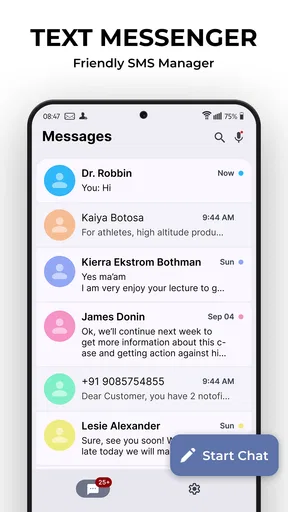
First things first, the Messages app is all about simplicity and functionality. You know how some apps try to throw a million features at you and end up confusing everyone? Well, not this one. It sticks to what it does best: messaging. Whether it’s SMS, MMS, or the more modern RCS messaging, it handles everything smoothly. Plus, it's available on both Android and iOS, so you won't miss out regardless of your device.
Design and Usability
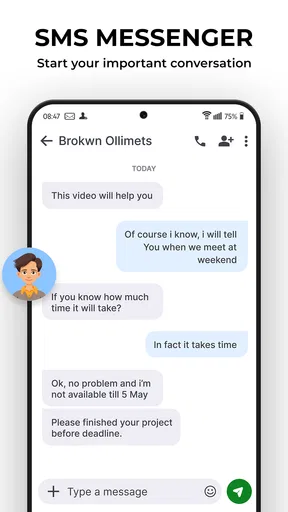
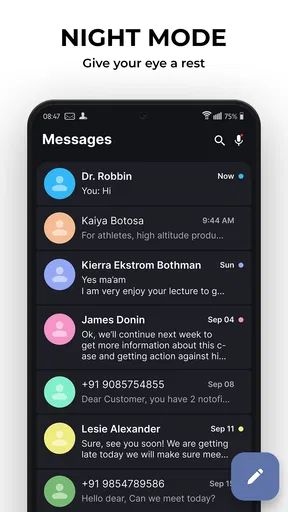
Let's talk about the look and feel. The user interface is clean and pretty intuitive. With a minimalistic design, everything is right where you’d expect it to be. The color scheme is easy on the eyes, and the chat bubbles make conversations clear and engaging. You can even customize your chat backgrounds if you’re in the mood to jazz things up a bit.
Navigating through the app feels natural. There’s a handy search feature that lets you dig through your message history, which is a lifesaver when you can't remember exactly where that one important message is hiding.
Features That Stand Out
Now, onto the cool stuff. Besides the standard texting, this app supports a ton of features that make communication fun and efficient. You can send voice messages, which I find super convenient when I’m on the go and can’t type out a long message. Plus, the multimedia support is on point. Pictures, videos, GIFs—they all send without a hitch.
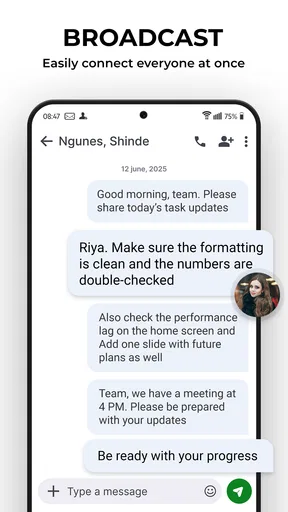
Group chats are another highlight. They’re easy to set up, and the app makes it seamless to manage conversations with multiple people. One feature I particularly love is the ability to mute conversations. Perfect for those times when you need a break from the constant pinging.
Security and Privacy
In today’s world, security is a big deal, right? The Messages app has end-to-end encryption for RCS messages, which means your chats are secure from prying eyes. It’s reassuring to know your conversations are private, especially when you’re sharing sensitive information.
Seamless Integration
One of the app’s strengths is how well it integrates with other apps and services. You can easily share your location, contacts, or even calendar events directly from the app. It also works nicely with Google Assistant, letting you send messages hands-free, which is super handy when you’re multitasking.
If you’re using it on an Android device, the integration with Google services makes it even more powerful. From sending messages via your smart speaker to syncing across devices, it’s all about making life easier.
What to expect before making it your default
The published release date is March 9, 2026, and BOTTRRIER is the developer. The current version is 1.1.0; the app is free, has an Everyone age rating, and has passed 100,000 installs. Its average rating is 4.5 from 292 ratings, alongside 11 written reviews. I read that as a positive sign of interest, not a guarantee that it will behave the same way on every phone or suit every messaging routine.
Because this is a preset SMS app, the most useful first step is to see how it behaves with the contacts and messaging services I actually use. I would check that the correct SIM or number is selected, send a simple test to someone I know, and confirm that replies arrive in the expected thread. That small check is more practical than assuming every device handles default messaging in exactly the same way.
For media or group conversations, I would also pay attention to what happens when a recipient cannot use the same richer messaging option. A plain text is often enough for a quick confirmation, but photos and larger exchanges can be less predictable across different services and network conditions. If a message is time-sensitive, I keep it short and make sure the recipient has acknowledged it rather than treating a sent indicator as proof that the plan is settled.
Final Thoughts
Overall, the Messages app is a solid choice for anyone who values straightforward and reliable communication. It may not have the flashy features of some other apps, but what it does, it does well. It’s like that trusty old friend who’s always there when you need them.
If you’re looking for an app that keeps communication simple yet effective, give Messages a try. You might just find it’s exactly what you’ve been looking for!
My recommendation
I would try it if ordinary texting is already a regular part of my day and I want a dedicated place for those exchanges. Its appeal is less about collecting every possible communication tool and more about making familiar tasks feel easy: a quick check-in, a practical group plan, or finding an old detail without hunting through unrelated apps. That narrow purpose is a strength when it matches your habits.
I would skip it as my main choice if I need a single solution for every device, a guaranteed shared experience with all my contacts, or a platform selected specifically for advanced privacy features. In those cases, a purpose-built internet messenger may be a better fit, while standard SMS remains useful for reaching people outside that service. My verdict is that Messages is worth considering as a simple everyday texting option, provided I test its fit on my phone and choose the communication channel according to the conversation.
Pros
- User-friendly interface with intuitive navigation.
- Supports multimedia messaging
- including images and videos.
- End-to-end encryption ensures privacy.
- Seamless integration with other apps.
- Quick and responsive message delivery.
Cons
- Limited customization options for themes.
- Lacks advanced search functionality.
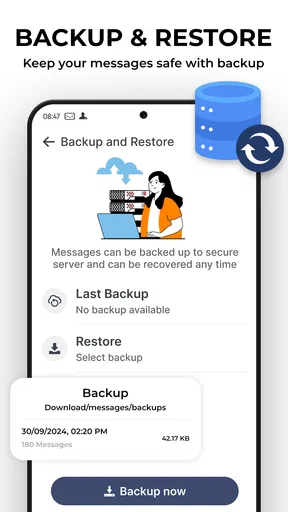
- No built-in backup for message history.
- Can drain battery due to background activity.
- Occasional delay in notifications.
FAQs for Messages
What features does the Messages app offer?
The Messages app provides a range of features including text messaging, multimedia sharing (photos, videos, and audio), group chats, and location sharing. It also supports read receipts, typing indicators, and end-to-end encryption for secure communication. Users can personalize notifications and enjoy seamless integration with other apps.
Is the Messages app secure and private?
Yes, the Messages app prioritizes user privacy and security by offering end-to-end encryption for personal and group chats. This means only you and the person you're communicating with can read what is sent, ensuring your conversations remain private from third parties, including the app provider.
Can I use the Messages app on multiple devices?
The Messages app can be used across multiple devices, allowing for seamless communication whether you're on your smartphone, tablet, or desktop. Ensure your account is synced across devices for a consistent messaging experience, though features may vary slightly depending on the platform.
Does the Messages app support multimedia sharing?
Absolutely, the Messages app supports sharing of various multimedia formats such as photos, videos, and audio clips. Users can easily share their location, GIFs, and even contacts. The app compresses media files to ensure quick sharing without compromising too much on quality.
Is the Messages app free to use?
The Messages app is generally free to download and use. However, depending on your mobile plan, sending messages or media through the app may incur charges, especially when using mobile data rather than Wi-Fi. Always check with your service provider for details on messaging rates.


